Overview
This page is a one-page orientation: what a workflow looks like, the configuration object that defines it, and how its parts connect. Each section links out to the deeper references.
What a workflow looks like
Four regions to recognise on every workflow page:
- Topbar — workflow-level controls (export, history, run-all, panel toggles).
- Navigation — the step tree, with the active step highlighted.
- Input — the active step's auto-generated form and its run controls.
- Output — the step's viewer or scalar block.
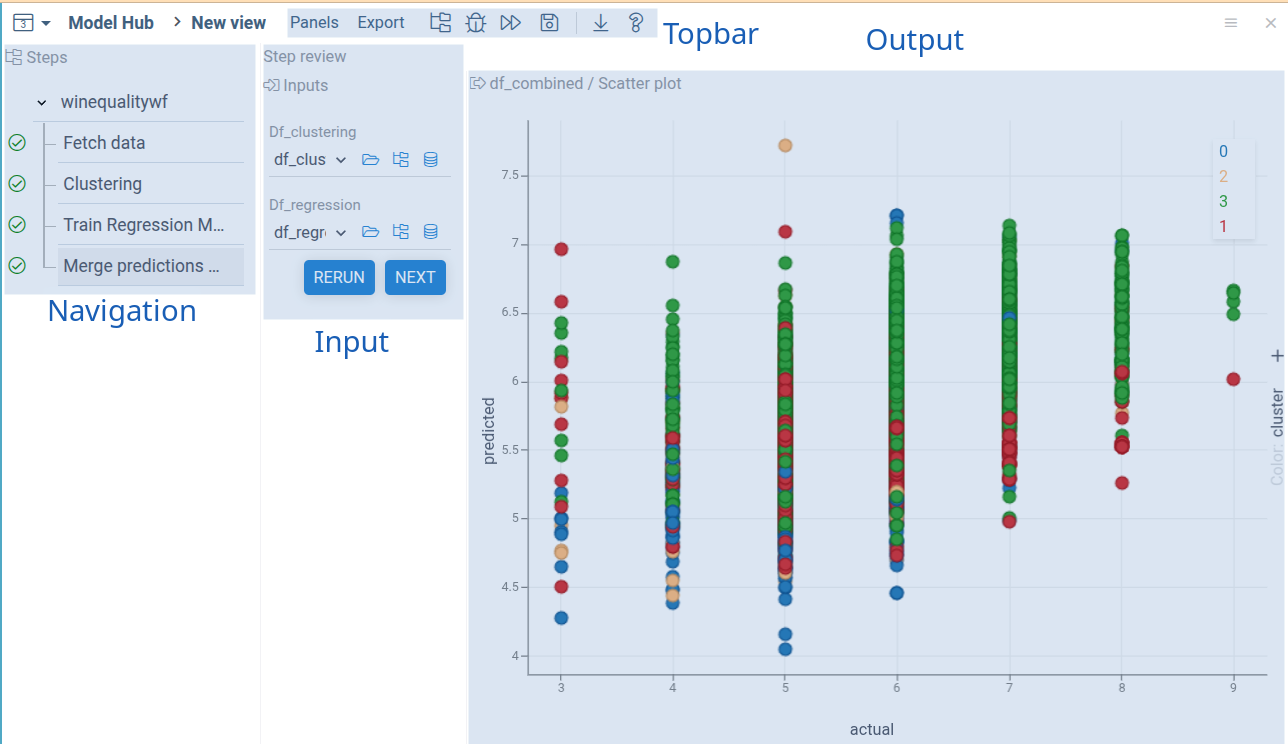
Each region maps onto a part of the configuration object covered next.
How it's defined
A workflow is a TypeScript function — the workflow provider — that
returns a PipelineConfiguration. The callouts below link to each
field's canonical reference:
Configuration — the central artifact
A workflow is fully described by a single TypeScript object of type
PipelineConfiguration — in code the type and its runtime cousins use
the Pipeline* prefix; throughout these docs the prose calls it a
workflow. The configuration is a tree: workflows contain steps; steps
are either script nodes, nested workflows, or references to other
workflows. Every node has an id. The type field discriminates
workflows (static, dynamic, action, ref); leaves are scripts
(type: 'step', or omitted). See the Configuration reference
for every field.
Links live alongside steps inside a workflow and propagate data between
IOs. Data flow is forward-only, in depth-first order through the tree.
Some link roles target virtual outputs rather than script IOs —
validator for per-IO validation, pipelineValidator for workflow-level
checks, meta for UI hints, nodemeta for step titles and descriptions,
plus the user-triggered action. The check and rule links do the same
jobs without code, see Rules and checks. See the
Link reference for the catalogue and
Link queries for how from/to paths
are written.